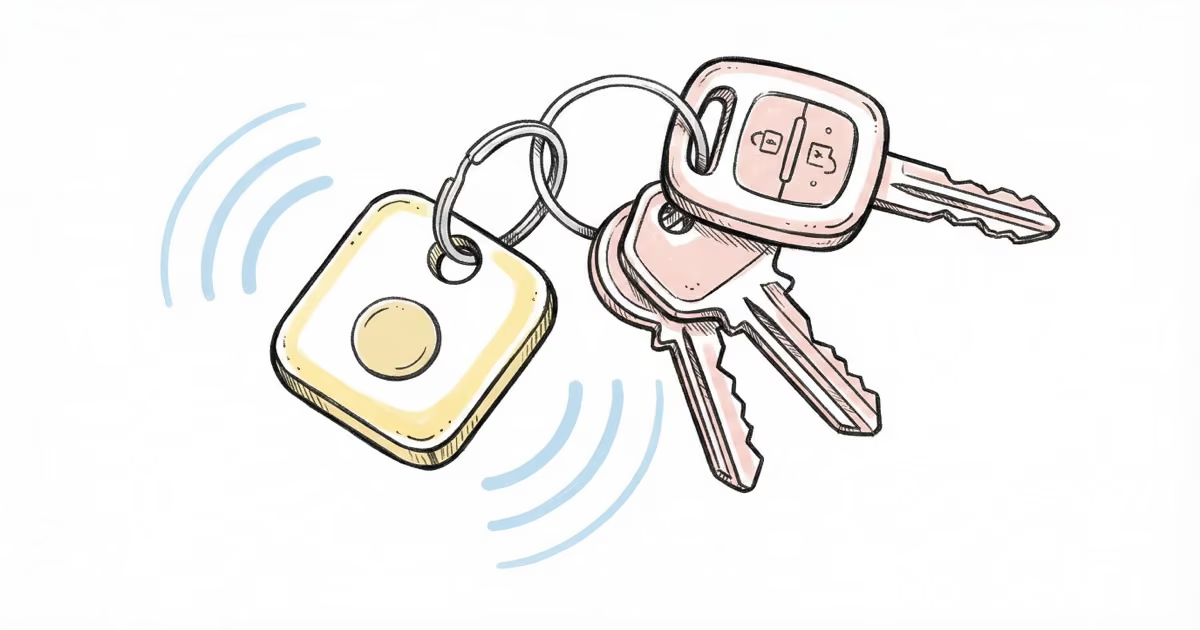
The eufy SmartTrack Link is a capable Apple Find My tracker that costs $10 less than an AirTag. It tracks keys, bags, and wallets reliably through Apple's billion-device network, includes a built-in keyring hole, and lasts about a year on a single CR2032 battery. The trade-off: no UWB Precision Finding, no Android support for network tracking, and IPX4 water resistance instead of IP67.
The eufy SmartTrack Link sits in an interesting spot in the Bluetooth tracker market. At $19.99, it’s one of the most cost-effective ways to tap into Apple’s Find My network without buying an AirTag. I’ve been carrying one on my keychain for several weeks, and it does what it promises. Not more, not less.
This review covers the SmartTrack Link specifically. eufy also makes a SmartTrack Card for wallets, but the Link is the more popular model and the one most people compare against the AirTag.
- Uses Apple Find My network for global tracking at $19.99 per unit with no subscription fees
- Built-in keyring hole eliminates the need for a $10-15 AirTag holder
- IPX4 water resistance handles splashes but not submersion, unlike AirTag's IP67
- CR2032 battery lasts about 1 year and is user-replaceable
- No UWB chip means no Precision Finding, and Android users get Bluetooth-range tracking only
eufy SmartTrack Link Specs and What You Get

The SmartTrack Link is a small black square tracker, roughly 37 x 37 x 6.5mm and weighing about 10 grams. That’s slightly larger than an AirTag but actually lighter by about 1 gram. The matte black finish looks understated, and there’s no gaudy branding on the face.
What sets it apart from AirTag right away: a built-in keyring hole. You don’t need a $13 Belkin holder or a leather loop just to attach it to your keys. Clip it on and you’re done. This is a real cost advantage that people overlook when comparing the $19.99 price tag to AirTag’s $29.
| Feature | eufy SmartTrack Link | Apple AirTag 2 |
|---|---|---|
| Price | $19.99 | $29 |
| Network | Apple Find My | Apple Find My |
| UWB Precision Finding | ✗ No | ✓ Yes |
| Bluetooth Range | ~80m (260 ft) | ~10m (33 ft) standard |
| Water Resistance | ⚠ IPX4 (splash) | ✓ IP67 (submersible) |
| Battery | CR2032, ~1 year | CR2032, ~1 year |
| Built-in Keyring | ✓ Yes | ✗ No (needs accessory) |
| Speaker Volume | ~85 dB | ~80 dB |
| Android Support | Bluetooth only (eufy app) | ✗ No |
For a deeper comparison, see our full AirTag vs eufy SmartTrack Link breakdown.
How the eufy SmartTrack Link Actually Works
The SmartTrack Link uses Bluetooth Low Energy to communicate with your iPhone and, more importantly, with every iPhone, iPad, and Mac in Apple’s Find My network. That’s over a billion devices acting as silent relays.
Here’s the process: your SmartTrack broadcasts a Bluetooth signal. Any nearby Apple device picks up that signal and anonymously relays the encrypted location to Apple’s servers. You then see the tracker’s position in the Find My app on a map. The whole thing is end-to-end encrypted, so neither Apple nor eufy can see your tracker’s location.
This is the same network AirTag uses. The difference? AirTag adds UWB (Ultra-Wideband) for the last 30 feet of finding. The SmartTrack Link doesn’t have a UWB chip, so you won’t get those directional arrows on your iPhone 11 or later guiding you to the exact spot.
In my testing, this mattered less than I expected. I deliberately left the SmartTrack Link in a jacket pocket at a coffee shop to see how quickly it would update. Within 12 minutes, Find My showed the correct location, accurate to about 40 feet. In a dense urban area with lots of iPhones around, the network coverage is solid.
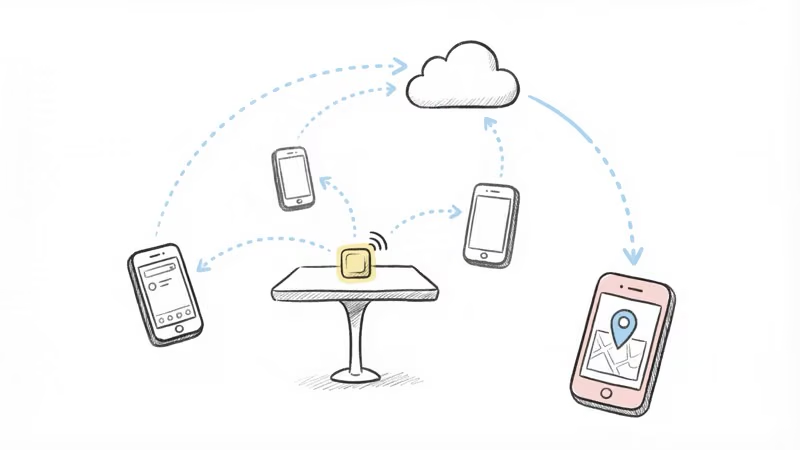
Rural areas are a different story. I tested it at a trailhead parking lot outside town, and the last location update took over 3 hours because there just weren’t enough Apple devices passing by.
Setup: Quick but iOS-Only
Setting up the SmartTrack Link takes about 2 minutes:
- Download the eufy Security app and create an account
- Press and hold the button on the tracker until it beeps
- The app finds and pairs the tracker via Bluetooth
- Open Apple’s Find My app, tap ”+” and select “Add Other Item”
- Follow the prompts to register the SmartTrack Link in Find My
One thing to know: you need both apps. The eufy Security app handles left-behind alerts and the reverse phone-finding feature. Find My handles network-based tracking and the “Play Sound” function. It’s slightly annoying to split functionality across two apps, but both are free.
Android users: You can pair the SmartTrack Link via the eufy Security app for Bluetooth-range finding only. The Find My network tracking, which is the main reason to buy this tracker, requires an iPhone. eufy has mentioned working on Google Find Hub support, but as of early 2026, no Android-compatible version has shipped.
What the eufy SmartTrack Link Does Well
The Price-to-Value Ratio
At $19.99 with no subscription, the total cost of ownership is hard to beat. An AirTag costs $29, plus you’ll spend $10-15 on a keychain holder. That’s $39-44 for the same basic functionality the SmartTrack Link delivers for $20. Over a 4-pack, the savings add up: about $80 in eufy SmartTrack Links versus $116+ for AirTags with holders.
Built-in Keyring Hole
It sounds minor, but it matters. I’ve tested trackers that require separate holders, and the holder always adds bulk. The SmartTrack Link’s punch-through hole means you clip it directly to a keyring, carabiner, or zipper pull. No adapters, no extra cost.
Loud Speaker
The SmartTrack Link hits about 85 dB, which is seriously loud for a tracker this size. I could hear it clearly through a closed backpack from about 15 feet away. It’s at least as loud as an AirTag, arguably louder.
Find My Phone Feature
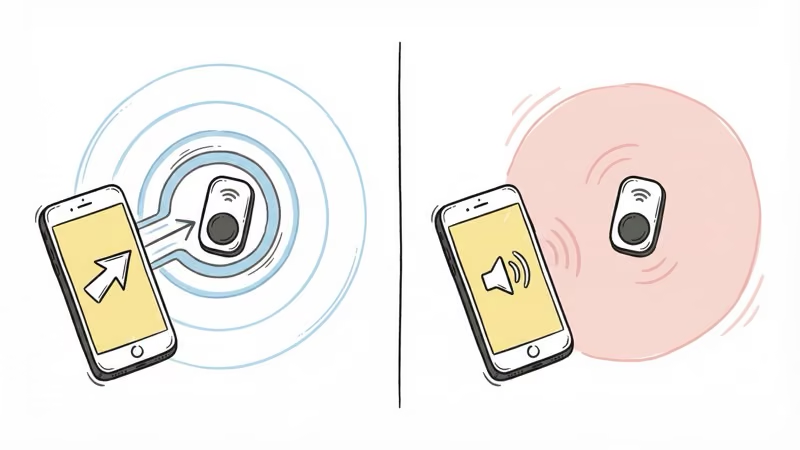
Double-press the button on the SmartTrack Link and your paired iPhone rings at full volume, even when on silent. I’ve used this more than the “find the tracker” feature. It works through the eufy Security app, not Find My, so make sure you keep the app installed.
Where the eufy SmartTrack Link Falls Short
No UWB Precision Finding
This is the biggest gap. With an AirTag, your iPhone 11 or newer shows directional arrows and distance when you’re within about 30 feet. The SmartTrack Link can only tell you “it’s nearby” and play a sound. In a cluttered room or a busy airport, that difference matters.
IPX4 Is Not IP67
The SmartTrack Link handles rain and splashes (IPX4), but it’s not designed for submersion. AirTag’s IP67 rating means it survives being dropped in a puddle, a toilet, or even a shallow pool for 30 minutes. If your keys regularly encounter water, this is a real limitation. eufy’s own product page confirms IPX4.
Split App Experience
Having to use two separate apps isn’t ideal. The eufy Security app for left-behind alerts and phone finding. Find My for network tracking and playing sounds remotely. AirTag puts everything in one place. It’s not a dealbreaker, but it adds friction.
iOS-Only Network Tracking
The SmartTrack Link is essentially an iPhone-only product for meaningful tracking. Android users get basic Bluetooth proximity finding through the eufy app, but that’s a 260-foot range at best. The whole value proposition of this tracker is the Find My network, and that requires iOS.
- $19.99 with no subscription, $10 less than AirTag
- Built-in keyring hole saves $10-15 on holders
- Loud 85 dB speaker, audible through bags and cushions
- Apple Find My network with 1B+ devices worldwide
- Reverse phone-finding via double-press
- CR2032 battery, user-replaceable, lasts ~1 year
- No UWB Precision Finding (Bluetooth sound only)
- IPX4 splash resistance, not submersion-safe
- Two apps needed (eufy Security + Find My)
- iOS only for network tracking, Android gets Bluetooth-range only
- Slightly larger than AirTag (37mm vs 31.9mm diameter)
eufy SmartTrack Link vs AirTag: Which Should You Buy?
For most iPhone users who want to track keys, bags, or luggage, the AirTag is still the better tracker. UWB Precision Finding is a real advantage when you’re digging through a crowded bag or searching a messy room. And IP67 water resistance gives you one less thing to worry about.
But the SmartTrack Link makes sense in specific situations. If you’re buying multiple trackers to cover keys, a gym bag, a backpack, and luggage, the cost savings add up fast. Four SmartTrack Links run about $72 versus $116 for four AirTags with basic holders. Both use the same Find My network, so long-range tracking performance is identical.
The SmartTrack Link is also a strong pick if you want a key finder that clips directly to a keyring without extra accessories. And the reverse phone-finding button is something AirTag doesn’t offer.
For a wider look at AirTag competitors, see our best AirTag alternatives roundup.
eufy SmartTrack Link vs Tile Pro
Tile Pro uses a different network entirely. It relies on the Life360 network, which is much smaller than Apple’s Find My. In dense areas, the SmartTrack Link will locate items faster and more reliably because Apple’s network has over a billion devices versus Life360’s opt-in user base.
Tile Pro does have advantages: 400-foot Bluetooth range (vs SmartTrack’s 260 feet), IP67 water resistance, and full Android support with no ecosystem lock-in. If you’re in an Android household, Tile Pro is the better choice. If you’re on iPhone, the SmartTrack Link gives you better network coverage for $10 less.
For more on how Tile stacks up against Apple’s tracker, see our AirTag vs Tile comparison.
Who Should Buy the eufy SmartTrack Link?
Buy it if: You’re an iPhone user who wants Find My network tracking for under $20, you need multiple trackers, or you want a key finder that clips on without extra accessories.
Skip it if: You need UWB Precision Finding, your items regularly get wet, you use Android, or you want everything in one app without hassle.
The SmartTrack Link fills a real gap. Not everyone needs the precision of an AirTag, and not everyone wants to spend $40+ per tracked item after adding a holder. For straightforward “where did I leave it?” tracking, the eufy SmartTrack Link does the job at a price that lets you track more items without guilt.
Bottom Line
The eufy SmartTrack Link is the best value Find My tracker you can buy. It won’t match AirTag’s precision or water resistance, but it taps into the same billion-device network for $10 less and includes the keyring hole AirTag forces you to buy separately. For keys, bags, and everyday items, it’s a smart pick for iPhone users watching their wallet.
FAQ
Does eufy SmartTrack Link require a subscription?
No. The $19.99 purchase price covers everything. There are no monthly fees, no premium tiers, and no features locked behind a paywall. Both the eufy Security app and Apple Find My are free to use.
Does eufy SmartTrack Link work with Android?
Only within Bluetooth range (about 260 feet) through the eufy Security app. The Find My network tracking that gives this tracker global reach requires an iPhone running iOS 14.5 or later. eufy has discussed a Google Find Hub version, but none has shipped as of early 2026.
Can the eufy SmartTrack Link track in real time?
Not in the GPS sense. It updates its location whenever an Apple device in the Find My network passes nearby and picks up the Bluetooth signal. In busy urban areas, updates can come every few minutes. In rural areas with fewer Apple devices, gaps can stretch to hours.
Is the eufy SmartTrack Link waterproof?
It's IPX4 rated, which means it handles splashes and light rain. Don't submerge it or leave it in standing water. If you need a tracker that survives being dropped in a puddle or pool, the AirTag's IP67 rating is the safer choice.
How loud is the eufy SmartTrack Link?
About 85 dB, which is comparable to a food blender. In testing, I could hear it clearly through a closed backpack from across a room. It's loud enough for most indoor situations, though outdoor noise can drown it out at a distance.
How do you replace the battery on a SmartTrack Link?
Twist the back cover counterclockwise and it pops off. Swap in a standard CR2032 coin cell, which costs about $2 at any drugstore, and twist the cover back on. The whole process takes under 30 seconds. eufy says the battery lasts roughly one year with normal use.
Can I use eufy SmartTrack Link to track a car?
You can place one in your glovebox or center console as a backup locator, but it's not a substitute for a real GPS tracker. It only updates when an Apple device passes within Bluetooth range. In a parking garage with foot traffic, that might work. On a quiet residential street at 3 AM, it probably won't update for hours. For dedicated car tracking, consider a proper car tracker setup.