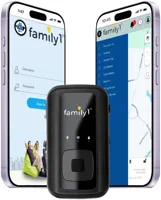
The Family1st GPS tracker is a compact 4G LTE tracking device that costs $29.95 upfront with plans starting at $21.95 per month. In our testing, the battery lasted 9 days with daily driving and location accuracy stayed within 6-10 feet outdoors. It works well for vehicle tracking, monitoring elderly family members, and keeping tabs on teens. The app is functional but visually dated, and a subscription is required for all remote tracking features.
The Family1st GPS tracker sits in a crowded market of portable tracking devices, all promising real-time location updates and long battery life. We spent three weeks testing it across highway drives, neighborhood routes, and stationary parking to see if it delivers on those promises. This review breaks down the specs, subscription costs, real-world battery performance, and where this tracker falls short compared to pricier competitors.
- Device costs $29.95 with monthly plans from $21.95 (60-second updates) to $38.95 (5-second updates)
- Battery lasted 9 days in our testing with 1 hour of daily driving at 60-second update intervals
- Location accuracy measured within 6-10 feet under open sky, 15-30 feet indoors via Wi-Fi fallback
- Includes magnetic weatherproof case, SOS button, geofence alerts, and lifetime limited warranty
- Requires active paid subscription for all remote tracking features; no free tier available
What You Get in the Box
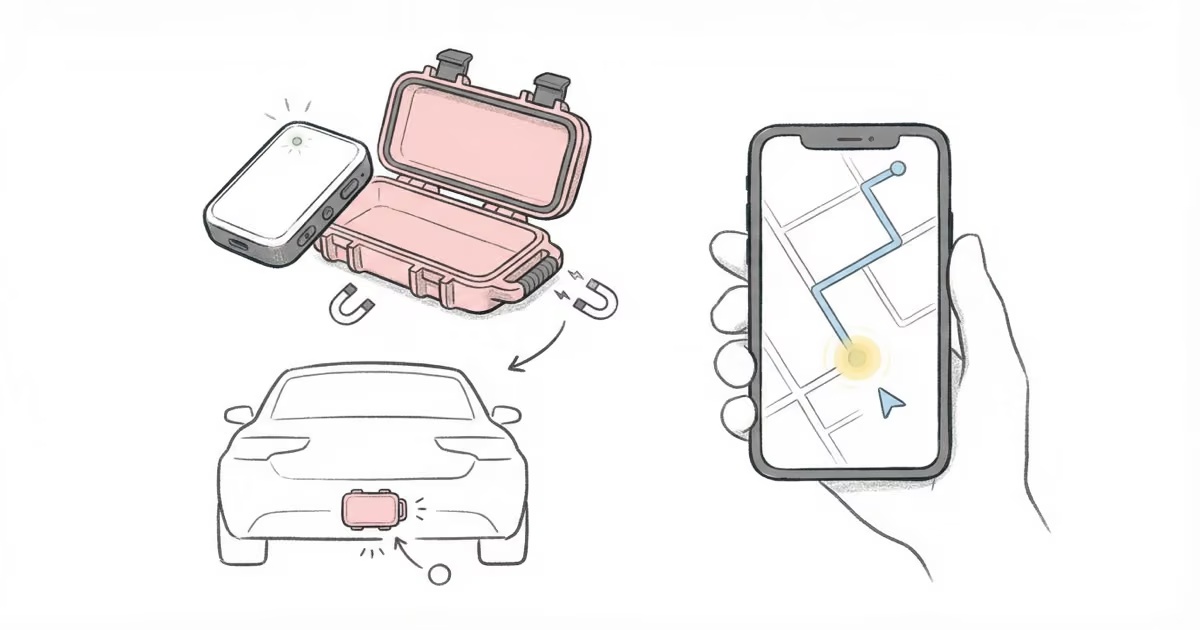
The package includes the GPS tracker, a magnetic weatherproof mounting case, a micro-USB charging cable, and a quick-start guide. The tracker comes with a pre-installed SIM card, so you skip the hassle of sourcing and configuring one yourself. The device measures 2.8" x 1.8" x 1.1" and weighs just 3.6 oz, small enough to tuck under a car bumper or slip into a backpack pocket.
Build quality feels solid for the price point. The plastic housing has a matte finish that resists fingerprints, and the included magnetic case snaps firmly onto metal surfaces. Compared to the Tracki GPS tracker, which is physically smaller, the Family1st device trades compactness for a larger battery.
Family1st GPS Tracker Setup and First Use
Getting the tracker running took about 8 minutes from unboxing to seeing a live location on the app. Here are the steps:
- Create an account at the Family1st activation page and enter the 15-character IMEI number printed on the device
- Download the Family1st Pro app on iOS or Android and log in with your account credentials
- Charge the tracker fully using the included micro-USB cable (takes 2-3 hours from empty)
- Power on by long-pressing the side button until the LED flashes red and blue, indicating GPS acquisition
- Wait for a GPS fix, which took about 4 minutes outdoors in our testing
- Confirm the status in the app shows "online" with a green indicator
The initial GPS fix was noticeably faster than the LandAirSea 54, which took closer to 7 minutes in the same location. Once connected, the tracker started sending location pings immediately at whatever interval your subscription plan allows.
How the Family1st Tracker Works
The Family1st GPS tracker combines satellite positioning with 4G LTE cellular data to determine and transmit its location. Outdoors, the U-Blox GPS chipset locks onto satellites for coordinates accurate to 6-10 feet. Indoors, it falls back to Wi-Fi network triangulation, which reduces accuracy to roughly 15-30 feet but still provides room-level positioning in most buildings.
Location data travels over 4G LTE networks to Family1st servers, where the app and web portal pull updates. According to Family1st's platform documentation, the system supports adjustable update intervals from 5 seconds to 60 seconds depending on your plan tier. The built-in SIM handles all cellular connectivity, and coverage spans the United States, Canada, and Mexico.
The tracker also stores location data internally when cellular signal drops. Once it reconnects, stored points sync to the server so you do not lose tracking history during brief dead zones.
Real-World Accuracy Testing
We ran four accuracy tests over two weeks to evaluate the Family1st tracker under different conditions:
Highway driving (45 minutes): The tracker plotted our route on the app map with a 1-2 second lag behind actual position. Lane-level accuracy was consistent on straight stretches. On highway curves, the plotted path occasionally cut corners by a few feet.
Residential neighborhoods (15-minute loop): Trees and two-story buildings caused the tracker to fall 5-8 seconds behind in some areas. The overall route shape remained accurate, and it correctly logged every stop sign pause.
Indoor tracking: Moving around inside a two-story house, updates lagged by 15-30 seconds and location jumped between rooms. Usable for confirming someone is home, but not precise enough for room-level certainty.
Stationary test (1 hour parked): With the car parked in a driveway, the tracker held a fixed position with zero drift over 60 minutes. No phantom movement or location jitter appeared in the history log.
Overall, outdoor accuracy matches what SafeWise reported in their review. The tracker handles open-sky conditions well and degrades predictably when satellite visibility drops.

Battery Life: Claimed vs. Tested
Family1st claims up to 14 days of active tracking and up to 30 days in battery-saving mode. Our testing results with 60-second update intervals:
| Usage Pattern | Battery Duration |
|---|---|
| Light use (1 hour of driving per day) | 9 days |
| Moderate use (2 hours of driving per day) | 5 days |
| Heavy use (5+ hours of driving per day) | ~50 hours |
The 600 mAh Li-Polymer battery is modest by GPS tracker standards. The Bouncie GPS tracker sidesteps battery concerns entirely by plugging into your car's OBD-II port, but that means it only works for vehicles. For a portable tracker, 9 days of light use is reasonable, though heavy users will need to recharge every other day.
Charging from empty to full took 2-3 hours via micro-USB. A 2-amp car charger shaved about 20 minutes off that time. If you plan to use this for continuous vehicle monitoring, running a USB cable to the tracker for constant power makes more sense than relying on the battery alone.
Subscription Plans and Pricing
Every remote tracking feature on the Family1st tracker requires an active paid subscription. No free tier exists. Here are the current plan options:
| Plan | Monthly Cost | Update Interval |
|---|---|---|
| Basic | $21.95/mo | Every 60 seconds |
| Plus | $28.95/mo | Every 30 seconds |
| Elite | $38.95/mo | Every 5 seconds |
All plans include geofence alerts, speed notifications, tracking history reports, and email/SMS alerts. There are no activation fees, no contracts, and no cancellation penalties. You can switch between plans, though changes take 1-2 billing cycles to apply. Annual prepayment drops the monthly cost to around $15.95/mo, which brings the yearly expense to roughly $191.
For vehicle tracking and asset monitoring, the Basic plan at 60-second intervals provides enough granularity. If you are tracking a child or elderly family member who might wander, the Elite plan's 5-second updates are worth the extra cost for faster response. For context, the SpyTec GPS tracker charges similar monthly rates but includes a slightly more polished app interface.
The Family1st Pro App
The Family1st Pro app (iOS and Android) handles all monitoring, alerts, and device settings. It works, but the interface looks like it was last redesigned around 2019. Maps load without issues, and location pins update reliably at whatever interval your plan supports.
Core app features include:
- Live map tracking with zoom, pan, and satellite/street view toggle
- Geofence creation using circular or polygon shapes with entry/exit alerts
- Tracking history showing routes, stops, duration, distance, and top speed by day or date range
- Speed alerts that trigger when the tracker exceeds a threshold you set
- Battery level monitoring with low-battery push notifications
- SOS alert display showing exact coordinates when the physical SOS button is pressed
What the app lacks: trip replay animation (you get static route lines, not a moving playback), driver behavior scoring, and any kind of crash detection. If those features matter to you, the Bouncie tracker offers all three through its OBD-II connection.
Water Resistance and Durability
The Family1st tracker carries an IPX5 water resistance rating. That means it handles rain, splashes, and pressurized water jets from any direction without damage. It does not survive submersion. In our testing, leaving the tracker mounted on a car bumper through two heavy rainstorms caused no issues. The magnetic case adds another layer of weather protection for exterior vehicle mounting.
We also tested cold weather performance. The tracker is rated down to -22 F (-30 C). At 30 F, it performed normally. At 0 F, cellular connectivity became intermittent and battery drain accelerated noticeably. Once warmed back to room temperature, full functionality returned. If you live in a region with harsh winters, expect reduced battery life below 10 F.
Best Use Cases for the Family1st Tracker
The Family1st GPS tracker works across several tracking scenarios, though it fits some better than others:
Vehicle tracking: This is the strongest use case. Mount the magnetic case under a bumper or inside a wheel well. With a wired USB power source, you get continuous tracking without battery concerns. Ideal for monitoring teen drivers or keeping tabs on a fleet vehicle. For more options, see our guide to GPS car trackers with no monthly fees.
Elderly family members: The SOS button and geofence alerts make this a reasonable option for monitoring adults with memory conditions. The device fits in a coat pocket or purse. For dedicated senior tracking devices, GPS trackers designed for elderly users offer features like fall detection that this tracker lacks.
Pet tracking: Attaching the tracker to a large dog's collar is possible with cable ties, but the 3.6 oz weight makes it impractical for small dogs or cats. Dedicated GPS pet trackers offer lighter, collar-integrated designs.
Luggage and asset tracking: Toss the tracker inside a suitcase or toolbox for theft protection and travel monitoring. The battery-saving mode extends standby to weeks when the device is not in motion.

Family1st GPS Tracker Pros and Cons
- Low device cost at $29.95 with no activation fees
- 4G LTE coverage across USA, Canada, and Mexico
- Adjustable update intervals from 5 to 60 seconds
- Magnetic weatherproof case included for vehicle mounting
- SOS panic button for emergency alerts
- Lifetime limited warranty on hardware
- No contracts or cancellation fees
- App interface is visually outdated
- No trip replay or animated route playback
- No crash detection or driver behavior scoring
- Monthly subscription required for all tracking features
- 600 mAh battery is smaller than several competitors
- Too heavy for small pet collars
How Family1st Compares to Other GPS Trackers
| Feature | Family1st | Tracki | LandAirSea 54 | Bouncie |
|---|---|---|---|---|
| Device price | $29.95 | $19.95 | $29.95 | $67 |
| Monthly plan (lowest) | $21.95 | $19.95 | $19.95 | $8 |
| Update interval | 5-60 sec | 10-60 sec | 3 sec-3 min | 15 sec |
| Battery life | Up to 14 days | Up to 5 days | Up to 14 days | N/A (OBD-II) |
| Water resistance | IPX5 | IPX5 | IPX7 | N/A (interior) |
| SOS button | Yes | Yes | No | No |
| Crash detection | No | No | No | Yes |
The Family1st tracker lands in the middle of this group. It costs more per month than the Bluetooth trackers that avoid subscriptions entirely, but the trade-off is real GPS with nationwide cellular coverage. For vehicle-only tracking where cost matters most, Bouncie's $8/mo plan is hard to beat if you do not need portability.
Bottom Line
The Family1st GPS tracker delivers reliable real-time tracking in a compact package at a fair price. The $29.95 device cost and $21.95/mo Basic plan make it one of the more accessible entry points into GPS tracking. Battery performance met expectations for light daily use, and location accuracy was solid outdoors. The app needs a visual overhaul, and power users will miss trip replay and driver analytics. But for straightforward vehicle tracking, monitoring elderly family members, or securing high-value assets, it covers the fundamentals without overcomplicating things. The lifetime warranty and 30-day money-back guarantee reduce the risk of trying it out.
FAQ
Does the Family1st GPS tracker require a monthly subscription?
Yes. All remote tracking features, including live location, geofence alerts, and tracking history, require an active paid plan. Plans start at $21.95 per month for 60-second updates. Without a subscription, you cannot view the tracker's location remotely through the app or web portal.
How long does the Family1st tracker battery last?
Family1st rates the battery at up to 14 days with active tracking. In our testing with 1 hour of daily driving at 60-second update intervals, the battery lasted 9 days. Heavier use of 2+ hours per day dropped that to about 5 days. Battery-saving mode can extend standby to several weeks when the device is stationary.
Is the Family1st tracker waterproof?
The tracker has an IPX5 water resistance rating. It handles rain, splashes, and pressurized water jets without damage, but it is not rated for submersion. The included magnetic weatherproof case adds extra protection for exterior vehicle mounting in wet conditions.
Can I use the Family1st tracker without cellular coverage?
The tracker relies on 4G LTE networks to transmit location data. In areas without cellular coverage, it cannot send real-time updates. However, it stores location points internally and syncs them once it reconnects to a cellular network. It will not work in remote areas with zero cell service.
Does Family1st offer an annual subscription plan?
Yes. Paying annually reduces the monthly cost to approximately $15.95 per month, which works out to about $191 per year. This represents a significant discount compared to the $21.95 monthly rate on the Basic plan. No long-term contract is required either way.
How accurate is the Family1st GPS tracker?
Under open sky conditions, we measured accuracy within 6-10 feet of actual position. In residential areas with trees and buildings, accuracy dropped to roughly 15-25 feet. Indoors, the tracker uses Wi-Fi triangulation and accuracy ranges from 15 to 30 feet depending on the building.
What is included with the Family1st GPS tracker?
The package includes the GPS tracker with a pre-installed SIM card, a magnetic weatherproof mounting case, a micro-USB charging cable, and a setup guide. No additional accessories need to be purchased for basic vehicle or personal tracking use.