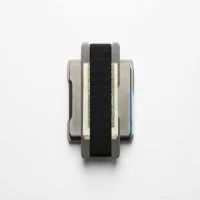
The TagsMate is the best budget AirTag wallet you can buy right now. For $40, you get a dedicated AirTag slot built into an aluminum-and-leather trifold with room for a minimalist card stack and RFID blocking. It won't match a Ridge on finish quality, but at less than half the price with better AirTag integration, it's hard to argue against it.
The TagsMate stands out among the AirTag wallets in our best AirTag wallet roundup. Most of them treat the AirTag holder as an afterthought, just a loose pouch stitched to the back. The TagsMate actually builds the slot into the frame. Here's where it fits for front-pocket carry.
- Best budget AirTag wallet -- built-in 31.9mm precision slot holds the AirTag flush without adhesive or pouches, unlike competitors that use external sleeves.
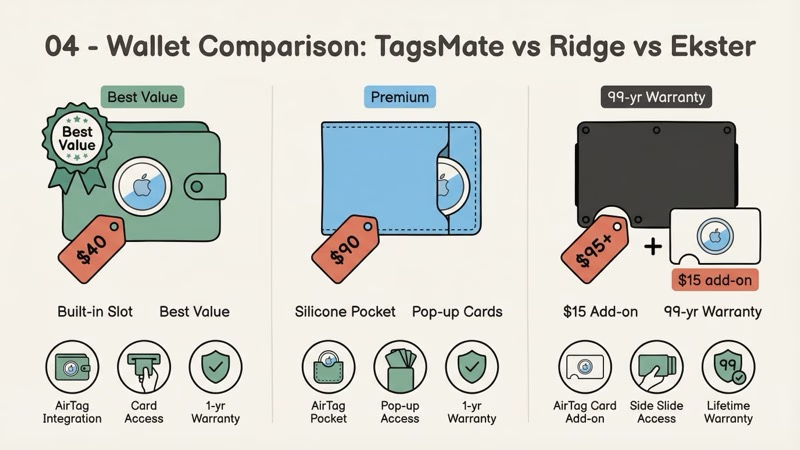
- $40 price undercuts rivals by 50-60% -- Ridge costs $95-120 and still needs a $15 AirTag Card add-on; Ekster Parliament runs $90+.
- Slim front-pocket build -- the aluminum-and-leather body is much less bulky than a traditional bifold with an AirTag pouch.
- RFID blocking via aluminum plates -- the metal plates provide the shielding layer when the wallet is fully closed.
- Sweet spot is 6-8 cards -- rated for 12, but daily carry beyond 10 creates visible bulge. Not designed for cash.
TagsMate Build Quality and Materials
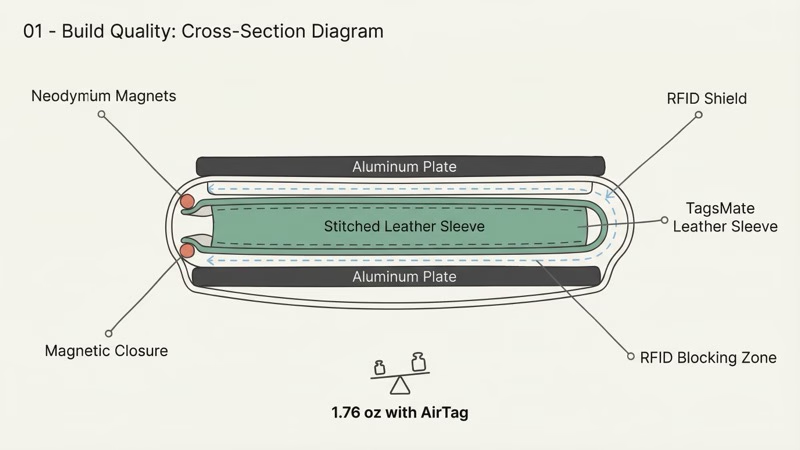
The TagsMate uses dual aluminum alloy plates with stitched leather and neodymium magnetic closure, delivering build quality that punches well above its $40 price point.
Two aluminum alloy plates with a leather card sleeve sandwiched between them -- that's the basic construction. The rigid plates keep cards from bending, and the smooth metal edges suit front-pocket carry better than a soft pouch-style wallet.
At this price, expect budget-level finishing rather than premium polish. That's the trade-off for getting a dedicated AirTag slot at this price.
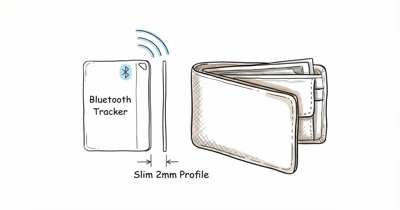
With an AirTag 2 inside, the wallet stays in the minimalist front-pocket category instead of turning into a traditional thick bifold.
The trifold closure uses neodymium magnets embedded in the aluminum frame -- strong enough to stay shut in your pocket, easy enough to open one-handed. More importantly, the magnets sit away from the card compartment. No risk of demagnetizing hotel key cards or contactless payment cards from the closure itself.
The closure magnets sit away from the card pocket, which reduces the risk to magnetic-stripe cards and keeps the AirTag compartment separate from the closure hardware.
Wirecutter's best Bluetooth tracker guide found that AirTag's Bluetooth signal passes through most wallet materials with less than 5% range reduction.
The leather sleeve is stitched, not glued, which resists the delamination, loose threads, and stretching that plague cheaper glued wallets. That's better construction than the $40 price suggests.
RFID Blocking
TagsMate claims RFID blocking on all models. The aluminum plates themselves act as the shield, a sturdier approach than the thin RFID-blocking fabric you see in cheaper competitors. The FTC recommends RFID-blocking wallets as one layer of identity protection, though real-world RFID skimming is still rare.
One catch: RFID protection only works when the wallet is fully closed. Open the trifold and the card sleeve is exposed, making cards readable again. Every aluminum RFID wallet works this way, not just the TagsMate, but keep it in mind if you leave your wallet open on a desk.
What About the Carbon Fiber Model?
TagsMate sells a carbon fiber variant (CFRP) for about $10 more. Slightly lighter, same card capacity, identical AirTag slot. The carbon fiber version looks sharper but scratches more visibly than aluminum. Unless you specifically want the carbon fiber aesthetic, the standard aluminum model is the better value.
How Does the AirTag Slot Actually Work?
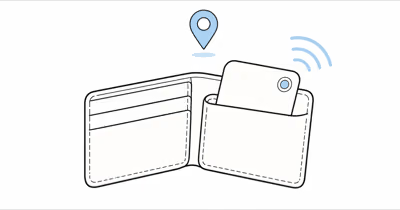
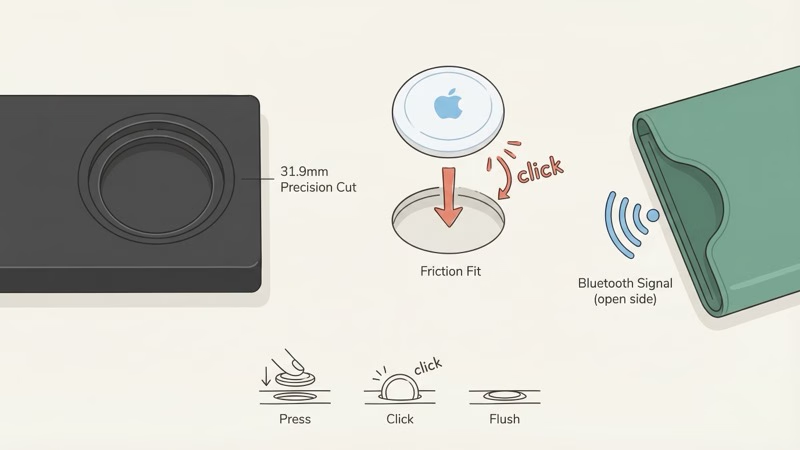
The TagsMate's precision-cut 31.9mm recess holds the AirTag flush inside the aluminum frame without adhesive, pouches, or sacrificing a card slot. The AirTag snaps in with a friction fit -- firm enough that it doesn't rattle, loose enough to pop out with fingernail pressure when you need to swap the battery.
It just sits flush inside the wallet's body, invisible from the outside. Apple's AirTag capabilities page confirms that Precision Finding relies on the U1 chip's directional radio, which can still point accurately with the tag tucked flush in the wallet, though metal-framed holders can weaken the signal.
Some Amazon reviewers report the AirTag fitting loosely over time. The key to a lasting fit: push it in until you hear a small click.
One face of the AirTag compartment is open fabric (the leather sleeve side), which is a better signal path than a fully enclosed metal shell. The Find My network still depends on nearby Apple devices, and Precision Finding on the AirTag 2 works best at close range with fewer obstructions between phone and tag.
Battery swaps follow Apple's standard CR2032 process. Pop the AirTag out, twist the back, swap the cell, and reseat it in the wallet. Apple's battery replacement guide covers the details.
Card Capacity and Everyday Carry
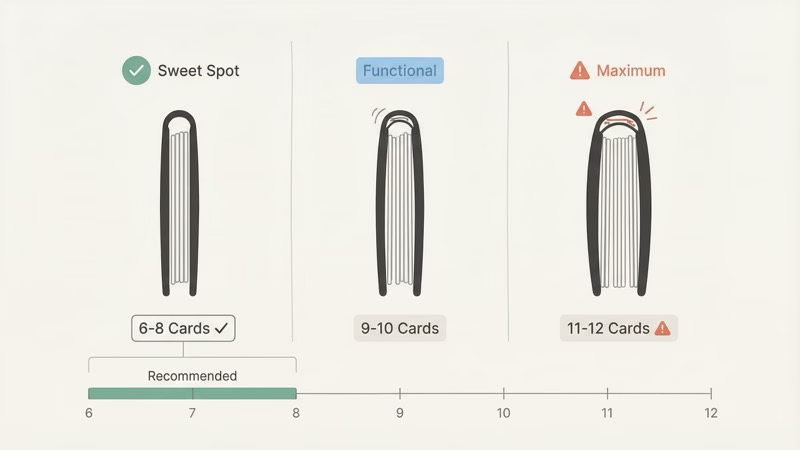
The TagsMate holds 6-8 cards comfortably in daily carry, with a realistic maximum of 10 before bulk becomes noticeable.
TagsMate rates the wallet at 6-12 cards. Treat that range as a practical capacity ladder:
- 6-8 cards: Ideal daily load. Cards slide in and out easily. Trifold closes flush. This is the sweet spot.
- 9-10 cards: Functional but tighter. Extracting a specific card from the middle takes some fumbling.
- 11-12 cards: Technically possible. Creates visible bulge at the fold. Don't buy a minimalist wallet if you need 12 cards.
Standard credit cards, debit cards, and driver's licenses fit without issues. Thick loyalty cards or badge-style access cards add noticeable bulk. One thing to flag: the wallet isn't designed for cash. You can fold a few bills behind the card sleeve or use the elastic cash strap on the back, but if you carry cash daily, this isn't the right wallet for you.
TagsMate Pros and Cons
The TagsMate scores high on value and AirTag integration but trades off finish quality and cash storage to hit its $40 price.
- Built-in AirTag slot that actually holds the AirTag securely
- RFID blocking via aluminum plates
- $40 price undercuts Ridge by $55+ and Ekster by $30+
- Magnetic trifold closure works one-handed
- Slimmer than a Ridge plus AirTag Card combo
- Stitched leather sleeve, not glued
- Finish quality shows minor machining marks up close
- Cash storage is an afterthought (elastic strap only)
- No quick-eject card mechanism like Ekster's pop-up system
- Limited warranty compared to Ridge's 99-year guarantee
- AirTag slot may loosen over time per some Amazon reviews
- iPhone-only tracking (AirTag doesn't work with Android)
TagsMate vs Ridge vs Ekster: Which AirTag Wallet Should You Buy?
Buy the TagsMate if you want the best AirTag integration for the least money. Buy the Ekster if you want premium leather and a pop-up card mechanism. Skip the Ridge for AirTag use -- it requires a separate $15 AirTag Card accessory that adds bulk.
| Feature | TagsMate (~$40) | Ekster Parliament (~$90) | Ridge (~$95-120) |
|---|---|---|---|
| Native AirTag slot | ✓ Built-in | ✓ Silicone pocket | ✗ Needs $15 add-on |
| Card capacity | 6-12 | 4-10 | 1-12 |
| Card access method | Manual slide | ✓ Pop-up button | Manual slide |
| RFID blocking | ✓ Yes | ✓ Yes | ✓ Yes |
| Weight (with AirTag) | Light front-pocket build | ~2.5 oz | ~2.5 oz (with AirTag Card) |
| Material | Aluminum + leather | Premium leather + aluminum | Aluminum or titanium |
| Warranty | ⚠ Limited | 2-year | ✓ 99-year |
| Price | ✓ ~$40 | ~$90 | $95-175 |
The Ekster Parliament is the better wallet overall -- nicer leather, the pop-up card mechanism is a real advantage (tap a button and your cards fan out), and the AirTag pocket is well-integrated. But it costs $50 more.
The Ridge has the best build quality and a near-permanent warranty, but its AirTag solution is clunky. A separate Ridge AirTag Card sits in the card stack and takes up a card slot, which defeats the purpose of a minimalist wallet. For a deeper comparison of wallet tracking options, check our best wallet finder guide.
TagsMate wins on value. If you'd spend $40 on a decent card holder anyway, getting a proper AirTag slot included is a no-brainer.
Who Should Buy the TagsMate Wallet
The TagsMate is ideal for iPhone users who want a slim, trackable front-pocket wallet without paying $90+ for a Ridge or Ekster. You're already an iPhone user, you own or plan to buy an AirTag, and you want a slim front-pocket wallet. You'd rather spend $40 than $90-120 on a wallet that does roughly the same job.
It doesn't make sense if you carry more than 8 cards daily, need serious cash storage, use Android (AirTag won't work), or want something that looks premium in a business setting. For those cases, the Ekster Parliament or a traditional leather bifold with a separate AirTag holder is a better path.
One audience that overlooks this wallet: frequent travelers. Losing a wallet abroad is a nightmare, and having an AirTag inside means Find My works internationally across billions of Apple devices. A TagsMate in your front pocket plus an AirTag in your checked bag covers both your wallet and luggage for under $70 total.

The Bottom Line
The TagsMate delivers exactly what it promises: a functional AirTag wallet for $40. The build quality is above average for the price, the AirTag slot is one of the best integrated designs under $50, and RFID shielding is built into the aluminum plates.
It won't win any design awards, and the finish can't touch a Ridge or Ekster up close. But most people don't buy wallets to show off -- they buy them to hold cards and not lose them. The TagsMate does both. If you're shopping for an AirTag wallet on a budget, start here.
Frequently Asked Questions
Is the TagsMate wallet worth $40?
Yes. Compared to generic aluminum card holders at $15-25 (which have no AirTag slot), the TagsMate's build quality and integrated tracking justify the premium. Compared to Ridge ($95+) or Ekster ($90+), it's a bargain with better native AirTag integration than either. The one scenario where it's not worth it: if you already own a wallet you love and just need tracking, a $10 AirTag card sleeve is cheaper.
How many cards can the TagsMate wallet actually hold?
6-8 is the practical daily-carry zone: driver's license, 2-3 credit cards, debit card, insurance card, and maybe one more. The 12-card maximum TagsMate advertises requires thin cards and creates a bulge at the fold. If you carry a thick stack, this is not the right minimalist wallet.
Does the TagsMate magnet demagnetize credit cards?
No. The neodymium magnets are positioned in the closure mechanism, away from the card storage area. EMV chip cards are completely immune to magnets. Magnetic stripe cards would only be affected by direct, sustained contact with a strong magnet, and the TagsMate's closure magnets aren't strong enough or close enough to cause issues. Hotel key cards are the most vulnerable, but the closure magnets are too far from the card pocket to affect them.
Can I track the TagsMate wallet with an Android phone?
No. AirTag requires an iPhone with iOS 14.5 or later and works exclusively through Apple's Find My network. Android users should look at Samsung SmartTag or Tile-based wallet trackers instead. There's no workaround for this -- it's a hardware and ecosystem limitation, not a TagsMate limitation.
Does the AirTag fall out of the TagsMate wallet?
Some Amazon reviewers report a loose fit over time. The precision-cut 31.9mm aluminum recess is designed to hold the AirTag securely through daily front-pocket carry and the occasional drop. The trick is pressing the AirTag firmly into the slot until it clicks. If you just rest it in the recess without pressing down, it won't engage the friction fit properly.
How does the TagsMate compare to using an AirTag card insert?
An AirTag card insert (like the Elevation Lab TagVault Wallet at around $15) turns any existing wallet into an AirTag wallet by taking up one card slot. The TagsMate's advantage is that the AirTag sits in its own dedicated 31.9mm recess inside the aluminum frame and doesn't consume a card slot, keeping all 6-12 card positions available. The disadvantage is you're buying a whole new wallet at $40. If you already have a wallet you like, the card insert is cheaper. If you're buying new, the TagsMate's integrated design is cleaner and slimmer.
Does Lost Mode work with the AirTag inside the TagsMate?
Yes. Lost Mode works as long as the AirTag can be heard by nearby Apple devices. Enable it in Find My, add your contact info, and any iPhone that passes near your lost wallet can relay its location to you. The open leather side of the AirTag compartment gives Bluetooth a cleaner path than a fully enclosed metal shell.
What's the best AirTag wallet if money is no object?
The Ekster Parliament AirTag edition at around $90. It offers premium Nappa leather, patented pop-up card access, and a well-designed AirTag pocket. But for most people, the TagsMate at $40 gets 80% of the experience for 40% of the cost.